Dollarbird Pro
- 3.3
- Rating
- 50.00K
- Installs
- Free
- Price

 Analysis by App-foxy
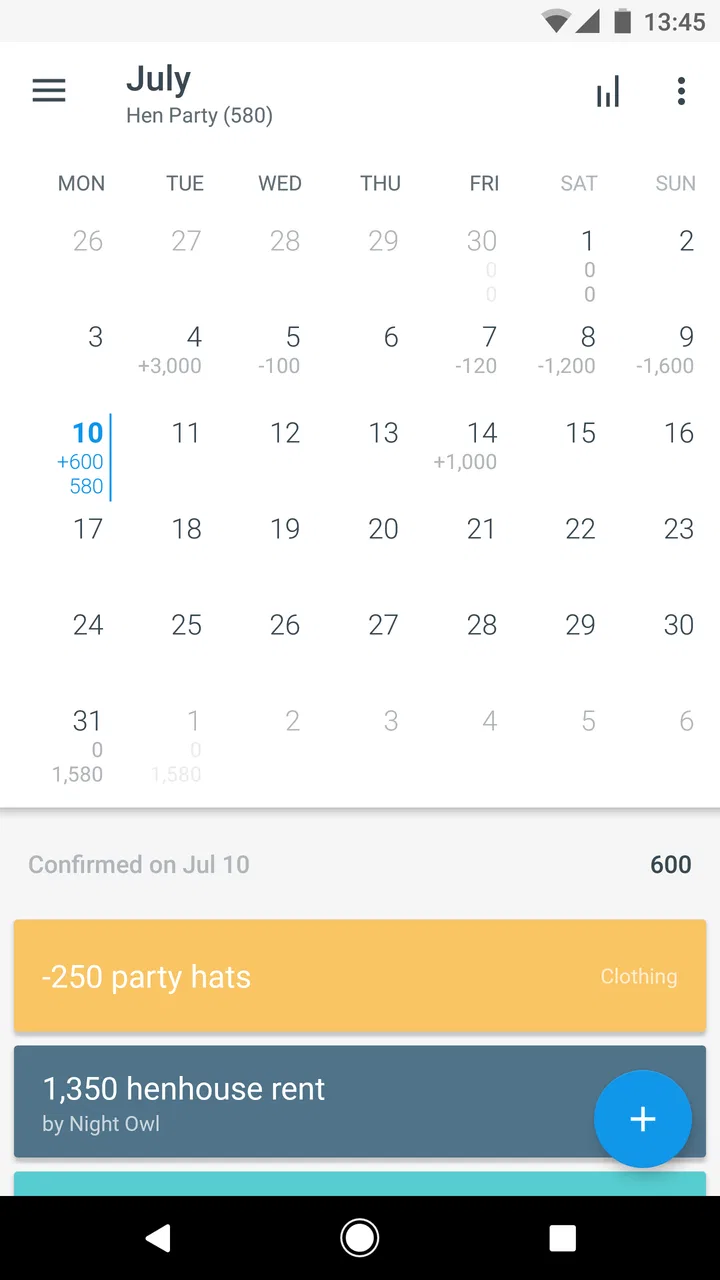
Managing money usually becomes difficult at the exact moment life gets busy. I have opened many budgeting tools with good intentions, only to stop using them when they demanded too much setup or made everyday spending feel like accounting homework. Dollarbird Pro takes a different route. It treats personal finance as a calendar, so income and expenses are placed on dates rather than hidden inside long lists of categories. That simple change makes the app easier to understand at a glance, especially when I want to know whether a payment is going to create a problem later in the month.
My overall impression is mixed but useful: this is a thoughtful finance app for people who plan around dates, recurring bills, and expected cash flow. It is less convincing for someone who wants a fully automated bank dashboard, detailed investment tracking, or a polished replacement for a traditional spreadsheet. The app is free to start, rated for Everyone, and comes from Dollarbird Apps SRL. Its store summary describes a personal finance calendar with an AI element, while the short store description identifies the product as Dollarbird Pro. That naming can feel slightly confusing, but the central idea is clear once I begin entering transactions.
How the calendar approach changes everyday budgeting
The first thing I notice is that the calendar is not just a decorative view placed on top of a normal expense tracker. Dates are the main organizing principle. Instead of asking only, “How much did I spend on food this month?”, I can ask, “What will my balance look like after rent, utilities, subscriptions, and my next paycheck?” That is a more practical question for people who sometimes run short before payday even when their monthly income is technically enough.
You May Also Like

 Blood Strike: 2.5 Anniversary
Blood Strike’s Loadouts Turn Every Drop Into a Tactical Gamble
A close look at Blood Strike’s custom loadouts: how fast access to signature weapons reshapes its battle royale rhythm, rewards preparation, and narrows the gap between fights.

 Pandora - Music & Podcasts
Pandora’s Music Is Easy to Start, but Harder to Recover
Pandora’s strength is its low-effort path from a seed to a station. Its weak spot is how much confidence it asks you to place in connection, setup, and quiet recovery.

 8 Ball Pool
 Is Built on Rivalries, Rematches, and Routine
A close look at the rivalries, rematches, shared routines, and unanswered safety questions that turn a quick pool match into a persistent mobile community.

 Samsung Music
’s Quiet Strength Is Playing What You Already Own
Its reach comes less from spectacle than from dependable access to a personal library. That simplicity is both the app’s strongest retention engine and its ceiling.

 AccuWeather: Weather Radar
AccuWeather Review: A Quick, Clear Forecast for Everyday Decisions
For everyday plans, the best forecast is the one you can understand quickly. AccuWeather makes rain timing, radar, and local conditions easy to act on, with a few trade-offs.

 Hill Climb Racing
Why Hill Climb Racing Still Turns Crashes Into One More Run
A tiny car, a bumpy hill and one more upgrade: Hill Climb Racing keeps resurfacing because its simple chaos makes every near-miss feel personal.
More From Our News Desk
View All News


I find this approach particularly helpful for fixed obligations. A salary can be added on its expected date, followed by rent, insurance, loan repayments, school costs, or other regular commitments. Once those entries are visible together, the important information is not just the total amount but the order in which money moves. A month with a comfortable total can still contain a difficult week, and a calendar makes that timing easier to see than a conventional category summary.
The app suits users who are willing to maintain a forward-looking plan. It is not magic, and the calendar becomes less useful when entries are forgotten or dates are inaccurate. I would treat it as a living forecast rather than a passive record. The best habit is to update it when a bill changes, a paycheck arrives early, or a planned purchase is postponed. That small discipline gives the calendar much more value than entering a pile of transactions once and never returning.
A realistic example is a household paid near the end of the month. Suppose I know that rent, a phone bill, and a school expense will leave the account during the first week, while groceries and transport are spread across the following days. By placing those events on the calendar, I can decide whether a nonessential purchase belongs before or after payday. A normal expense list may show that I can afford it overall; the calendar helps me decide whether I can afford it now.
Setting up a useful forecast without making it complicated
I would not begin by entering every coffee or small purchase from the past year. That creates work before the app has proved its usefulness. I would start with the next income date, the largest recurring bills, and any upcoming one-off payments. After that, I would add flexible spending in broad, realistic amounts. This creates a practical forecast quickly and leaves room to refine it as I learn which details matter.
One of the more useful habits is to separate certainty from assumption. A rent payment has a clear date and amount. Grocery spending is less predictable, so I would record a sensible estimate rather than pretending it is exact. This distinction matters because a calendar forecast can look precise while still depending on guesses. The app can organize those expectations, but I remain responsible for deciding how conservative they should be.
Recurring entries are also worth handling carefully. They save time when a payment genuinely repeats, but they can become misleading when a subscription changes price, a bill is seasonal, or a payment is cancelled. My advice is to review recurring items at the start of each month instead of trusting old entries indefinitely. That review takes less time than repairing a forecast that has quietly drifted away from reality.
A less obvious use is planning irregular annual costs. Rather than waiting for a large renewal to appear as a surprise, I can place it on the future date and then work backward to see how much breathing room is available. The calendar is especially good at exposing clusters of expenses. Several moderate obligations arriving close together may deserve more attention than one large payment surrounded by quiet weeks.
Where the AI angle helps, and where caution is sensible
The product presents itself as having a spark of AI, but I would not choose it solely for that phrase. The practical question is whether the assistance makes planning clearer without taking decisions away from me. In a finance app, suggestions are useful only when I can understand what they are based on and correct them easily. I prefer treating any automated interpretation as a starting point, not as an authority.
This is also where trust matters. Money records can reveal salary timing, household responsibilities, recurring services, travel plans, and personal priorities. I would avoid entering sensitive notes that are not necessary for the budget. I would also check the app’s visible privacy information and account controls before relying on it as my only financial record. The presence of an AI-related feature makes that review more important, because users should know what choices they are making when information is processed or used to produce suggestions.
I do not see a reason to hand over judgment about affordability to an automated feature. A forecast can tell me that an amount fits the entries I supplied, but it cannot know whether my income is secure, whether a medical cost is about to appear, or whether I am comfortable using my emergency savings. The strongest role for assistance here is reducing repetitive organization, while the final decision stays with the person using the app.
Trust, controls, and moments that deserve attention
For a finance tool, a friendly interface is not enough. I want clear control over what I enter, what is retained, and how I can correct or remove it. I also want to understand whether the app depends on an account, what happens if I change devices, and whether paid features affect access to information I have already recorded. These are not minor details; they determine whether the app feels like a dependable planning tool or merely a temporary notebook.
Dollarbird Pro is free to download, with optional in-app purchases listed from $7.99 to $79.99 per item. That makes it easy to try before spending money, but I would still inspect the purchase screen carefully. A free starting point does not automatically mean that every calendar or planning capability is available without payment. Before building a long-term system around it, I would make sure I understand which functions remain usable on the free path and what a purchase unlocks.
The app has been available since Jul 31, 2017, and the current version is 6.2.2. It supports Android from version 6.0 onward, which makes it accessible to many older devices. Its age rating is Everyone, so the product is positioned as a broadly suitable personal finance tool rather than an adult-only service. Those details help establish its general accessibility, but they do not replace my own check of privacy notices, sign-in choices, and deletion controls.
When I enter financial information, I would pause at any point where the app asks for more than I need to create a forecast. A budget can usually work with an amount, date, and description. If an optional field asks for identifying context, I would leave it blank unless that information genuinely improves organization. This is a useful principle for any finance app: the safest budget is often the one that contains only the information needed for the task.
I would also test correction before committing to the app. Enter a sample income, move its date, edit the amount, and remove it. Then check whether the projected balance responds in a way that makes sense. This small trial reveals more about user control than a promotional description does. If editing is quick and understandable, the calendar feels forgiving. If mistakes are hard to reverse, I would be much more cautious about using it for important planning.
Data-sensitive situations in normal use
There are several moments when I would slow down. The first is account creation or sign-in, because the account structure affects continuity across devices and the consequences of losing access. The second is enabling any feature that analyzes entries or offers automated help. The third is deciding whether to store information about another person, such as a partner’s income or a child’s expenses. Shared household planning can be useful, but everyone involved should understand what is being recorded and who can see it.
I would not use the app as a substitute for official bank records. A manually maintained calendar can be excellent for planning, but it should not be treated as proof that a payment cleared. Before paying a bill or disputing a transaction, I would confirm the details through the bank or service provider. This distinction is important: the calendar represents my plan, while the financial institution records what actually happened.
Another data-sensitive moment arrives when a phone is replaced or the app is removed. Before doing that, I would check how the account and stored information are handled, and whether there is an export or recovery route that suits my needs. I would not assume that reinstalling an app automatically restores everything. A finance workflow should have a backup plan, even if that backup is simply a separate monthly summary kept in a secure place.
Notifications deserve similar attention. A reminder can be useful for a bill, but showing a payment amount on a locked screen may reveal more than I want others to see. I would review notification settings and choose wording that does not expose sensitive details. This is a small privacy decision, yet it is exactly the kind of visible user choice that makes a finance app safer in everyday life.
Who benefits most from this format
I think the strongest audience is someone who thinks in pay cycles rather than accounting periods. If your main concern is whether the next two weeks are manageable, the calendar presentation is more natural than a dense dashboard. It can also work well for freelancers or households with uneven income, provided they are comfortable entering expected payments and revising the forecast when reality changes.
It is useful for people who repeatedly forget annual renewals, school costs, travel payments, or maintenance bills. Adding those events ahead of time turns vague worry into a visible planning problem. I especially like the possibility of looking beyond the current month, because many budgeting tools encourage attention to what has already happened while this format naturally asks what is coming next.
On the other hand, I would skip it if I want automatic transaction importing, advanced investment analysis, debt payoff modeling, or a detailed accounting system. A spreadsheet may be better for someone who wants complete control over formulas and custom reports. A bank-connected finance service may be more convenient for someone who refuses manual entry. A category-first budgeting app may suit users whose main goal is strict envelope allocation rather than date-based cash-flow planning.
The average rating is 3.3 from around 592 ratings, with 128 written reviews, and the app has passed 50K installs. I read those figures as a sign that it has a defined audience but is not a universally loved solution. That matches my experience: the concept is distinctive, yet the value depends heavily on whether the calendar matches the way I already think about money. A lower rating does not make the idea worthless, but it does make a trial period sensible before paying for optional items.
Practical routines that make the app more reliable
My preferred routine would be a short weekly check rather than constant tracking. I would compare the coming days with my bank balance, mark payments that have cleared, and adjust estimates that no longer look realistic. This avoids turning every small purchase into a chore while keeping the forecast connected to real life. For someone who enjoys detailed tracking, more frequent updates are possible, but they are not necessary for the calendar’s main strength.
I would keep a small buffer in the plan instead of forecasting down to the last cent. If the calendar says there is exactly enough money, that is not the same as being comfortable. A conservative buffer protects against price changes, timing errors, and ordinary surprises. It also prevents the app from encouraging false confidence simply because every known expense has been entered.
For shared finances, I would agree on naming conventions before adding entries. “Household,” “personal,” and “reimbursable” can mean different things to different people. Clear descriptions make the calendar easier to review later and reduce the chance that one person mistakes a planned payment for a completed one. I would also decide who is responsible for updating recurring expenses, because shared access without shared responsibility can leave the forecast stale.
Finally, I would use the calendar to make decisions, not to judge myself. If spending changes, I would revise the plan and look for the next safe adjustment. The app is most helpful when it turns money into a sequence of manageable choices: delay a purchase, reserve funds for a bill, or recognize that a particular week needs extra care. That practical feedback is more valuable than a perfect-looking historical chart.
My cautious verdict
Dollarbird Pro is worth trying if your financial life revolves around dates, paydays, and upcoming commitments. I like its central idea because it answers a question many ordinary budget tools handle poorly: when will money be available, and what will happen before the next income arrives? The free entry point lowers the barrier to testing that idea, while the Everyone rating and support for Android 6.0 or later make it approachable for a broad range of users.
I would remain deliberate about privacy and account choices, especially around sensitive financial entries and any automated assistance. I would also avoid assuming that a forecast is the same as a bank statement, and I would confirm the cost and scope of optional purchases before making the app part of a long-term routine. Those cautions do not cancel out its usefulness; they define the responsible way to use it.
My recommendation is therefore specific rather than universal. Try it when your biggest budgeting problem is timing, not categorization. Start with essential income and bills, test editing and recovery controls, keep personal details to a minimum, and see whether the calendar changes your decisions after a couple of pay cycles. If you want automatic data collection or professional-level financial reporting, choose another type of tool. If you want a clear forward view of everyday cash flow and are willing to keep it updated, this app offers a genuinely different way to stay ahead of upcoming expenses.
FAQs for Dollarbird Pro
01What is Dollarbird Pro and what can I use it for?
Dollarbird Pro is a personal finance and budgeting app designed to help you record income and expenses, organize transactions by category, and understand how your balance may change over time. Its calendar-based approach makes it useful for planning recurring bills, upcoming payments, and expected cash flow rather than simply reviewing past spending.
02Does Dollarbird Pro require an internet connection or an account?
The exact requirements may depend on the version and platform you install, but users should expect some features to require an account or an internet connection, especially when synchronizing data across devices or using cloud-related services. Before entering financial information, review the app’s current sign-in, synchronization, and offline-use policies in the store listing.
03Is Dollarbird Pro free, or does it include paid features?
Dollarbird Pro is a paid or premium version of the Dollarbird budgeting experience, so availability, pricing, and included features can vary by operating system, region, and current store offer. Check the Google Play or App Store page before downloading to confirm whether payment is required upfront and whether any subscriptions or in-app purchases are connected to the app.
04Can Dollarbird Pro connect directly to my bank accounts?
Dollarbird Pro is primarily intended for manually tracking and forecasting personal finances, so you should not assume that it automatically imports transactions from every bank or card provider. If bank synchronization is important to you, verify the current feature list carefully. Manual entry may take more effort, but it can provide greater control over what financial data is stored.
05Is Dollarbird Pro suitable for managing a household or shared budget?
The app can be helpful for household planning if everyone agrees on how income, bills, and expenses will be recorded, particularly when preparing for upcoming payments. However, shared access, collaboration, and synchronization options may depend on the current version and plan. Families should confirm whether multiple users can access the same financial calendar before relying on it for joint budgeting.
Pros
- Calendar-based layout makes future cash flow easy to visualize.
- Supports recurring transactions for regular income and expenses.
- Custom categories help organize spending around personal priorities.
- Cloud syncing keeps financial data available across supported devices.
- Useful for planning upcoming bills before they become due.
Cons
- Manual transaction entry can become tedious for frequent purchases.
- Advanced budgeting tools may feel limited for detailed financial planning.
- Accuracy depends on consistently recording every transaction.
- Currency and regional support may vary by device or account settings.
- The subscription cost may not suit users seeking a free finance tracker.

Dollarbird Pro
Gallery